KubeNDT
KubeNDT is a platform for deploying and operating virtual network topologies on Kubernetes - a Kubernetes Network Digital Twin.
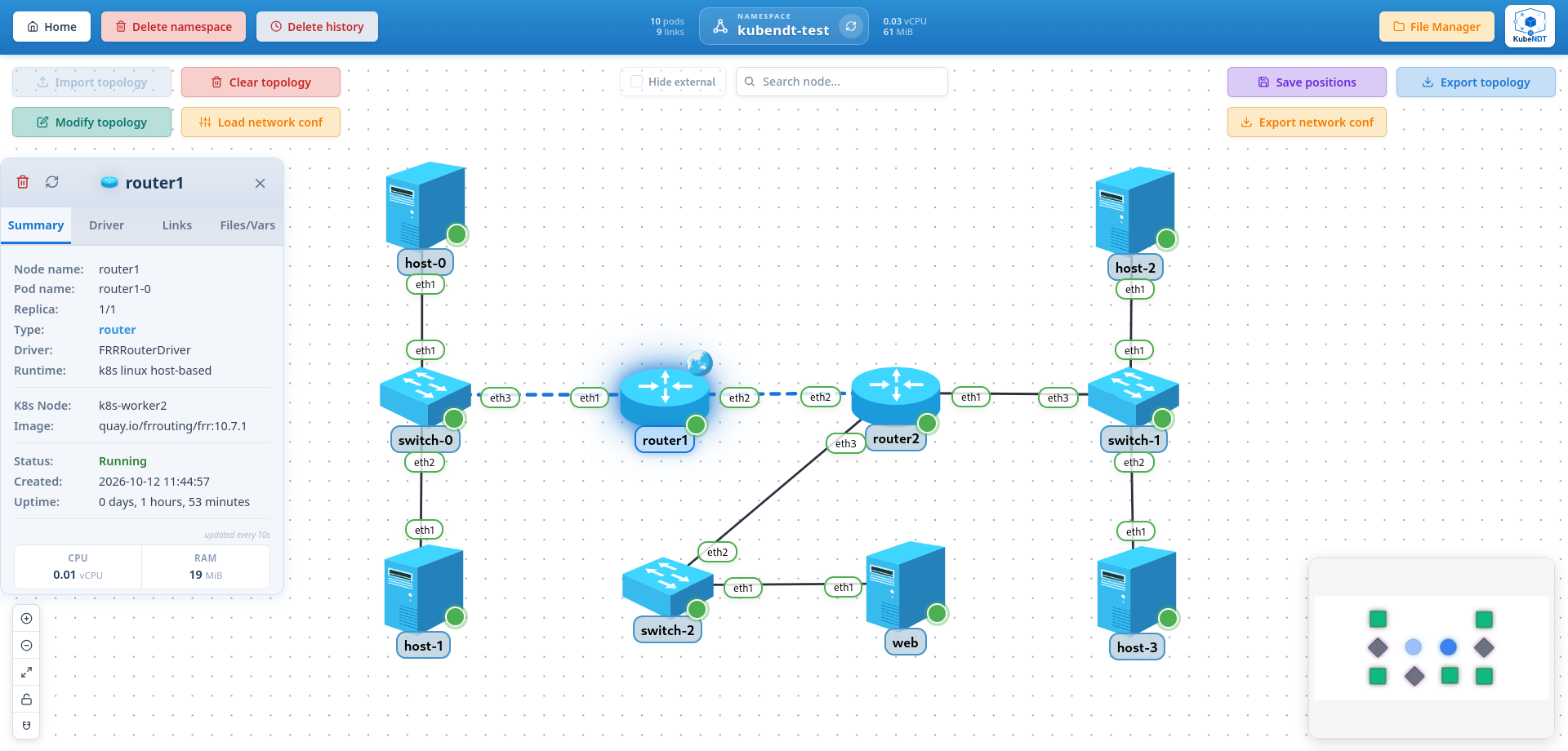
You define your topology as a JSON file (nodes, links, images, replicas) and
KubeNDT deploys it into your cluster and shows it as a live graph in the
dashboard. From there you can apply a network configuration (IP addresses,
routes, NAT, OSPF, bridging…) across all nodes at once, open a shell into any
of them, add or remove nodes on the fly, and monitor interface states in real
time. Any container image that keeps running works as a node: when it
lacks ip, tc or iptables, KubeNDT runs them from a toolbox container in
the pod.
Network configuration is abstracted through a driver and capability system: regardless of what image a node runs, the same declarative actions apply. The driver translates them into the right commands for that node type.
Key features
Core capabilities
- Real-time topology visualization with drag-and-drop node positioning, box or Shift-click selection to move several nodes at once, optional node repulsion and a lock toggle to freeze the layout.
- Multi-instance nodes via StatefulSets with configurable replicas.
- Virtual networking overlays powered by Meshnet CNI for custom L2/L3 connectivity.
- Link realization - see whether Meshnet wired each link as a veth pair or a VXLAN tunnel, and which worker each end runs on.
- Modular driver architecture for different node types (hosts, routers, switches) with extensible capabilities - see writing a driver.
- Interactive terminal shell over WebSocket for real-time pod access, plus
the shells a driver offers (
vtyshon FRR, the VyOS CLI). - Live pod logs in a floating viewer that follows the log, with filter and the previous instance after a restart.
- Dynamic network modification - add/delete nodes and links without redeploying the whole topology.
- Persistent topology state - save/export topologies as JSON, and the applied configuration as a network conf, for reproducible deployments.
Advanced networking
- Layer 2: interface management, bridge creation, VLAN configuration.
- Layer 3: IPv4 and IPv6 addressing (dual stack, several addresses per link end), static routing, default gateways.
- Uniform link MTU: every link gets the same MTU once it is wired, so throughput and OSPF adjacencies don't depend on where each pod landed.
- Routing protocols: OSPFv2 (areas, summarization, authentication),
OSPFv3 and RIP (RIPv2 and RIPng) as declarative actions on FRR and VyOS
routers, with redistribution between them. The rest of FRRouting is a
vtyshaway. - Traffic control (QoS): netem impairments (delay, jitter, loss, reorder, rate), htb class trees with flower matches, and per-link delay, jitter, loss and bandwidth declared in the topology.
- NAT / port forwarding: SNAT and DNAT configurations.
- Network diagnostics: real-time interface status and per-interface counters (rates, packets, errors, drops).
- Live packet capture: per-interface capture streamed to the dashboard,
with
.pcapexport. - Packet-path tracing: run a traceroute from any node, over IPv4 or IPv6, and follow each hop across the topology graph.
- Throughput tests: iperf3 between two nodes from the dashboard or the API, TCP or UDP, IPv4 or IPv6, with the server started by the platform on the destination.
Operations
- Multi-namespace support - isolate topologies per namespace.
- Meshnet health awareness - the dataplane's state is surfaced per cluster and per node, and topology changes are refused when it is missing.
- Authentication - password login, browser sessions, and revocable API tokens for programmatic access.
- RESTful API - Swagger-documented API for programmatic management (see the API Reference).
- File management - upload, organize, and mount configuration files into pods.
Where to next
- New here? Start with Concepts to understand topologies, drivers, and namespaces.
- Want to run it? Head to Getting started.
- Building an integration? Browse the API Reference.
- Running it for real? Operations covers what survives a failure and how to read the timing data the API returns.
- Curious about the internals? See the architecture guide in the repository.
How to cite
If you use KubeNDT in academic work, please cite it via its Zenodo record. The concept DOI below always resolves to the latest release:
García de la Calera Molina, E. (2026). KubeNDT: A Network Digital Twin platform in Kubernetes [Computer software]. https://doi.org/10.5281/zenodo.21276320
To pin a specific version, or for a ready-made BibTeX or APA entry, use the
CITATION.cff in
the repository.
KubeNDT is licensed under the GNU Affero General Public License v3.0 or later (AGPL-3.0-or-later). Commercial licensing may be available in the future.